Diffco US Inc · for AGAIQ Technologies
The platform demonstration: what to look at, and what comes next
A short guide to the new version of the demonstration: how to open it, a 20-minute tour, what changed, why it is not yet for daily use, and the points to discuss.
1What this is
A working demonstration of the platform as it stands today. It follows the version AGAIQ received to try on 23 October.
It is
- The real product screens, running end to end.
- Fictional people and companies, with five days of history.
- A place to try the product shape and react to it.
It is not
- Not production, and not for real company data.
- Not connected to Microsoft 365. Teams and email are simulated.
- Not on a language model. A built-in demonstration engine answers fixed example sentences.
2How to open it
- Open the link: https://4540.agaiq-dev-bemsh-andrei-diffco.vm.diffcorp.com/
- On “Choose who you are acting as”, choose John Doe, Finance Supervisor. He supervises two digital employees, Rakan and Dana. The whole tour in section 3 uses him.
- Allow about 20 minutes for the tour.
Before starting
- The top bar shows “Simulated channels” and “Offline demonstration”. Both are expected.
- The demonstration engine understands the example sentences in this guide. Type them exactly as written.
- Anyone with the link can act as any person and can save changes. Do not enter real data.
- It holds demonstration data only. We may reset it at any time.
- To act as another person, open “How to try this” at the top and press “Switch to this person”.
3A guided tour in five stops
Each stop says what to open, what to try and what to notice. The screenshots show the demonstration data.
3.1Home: what needs the supervisor
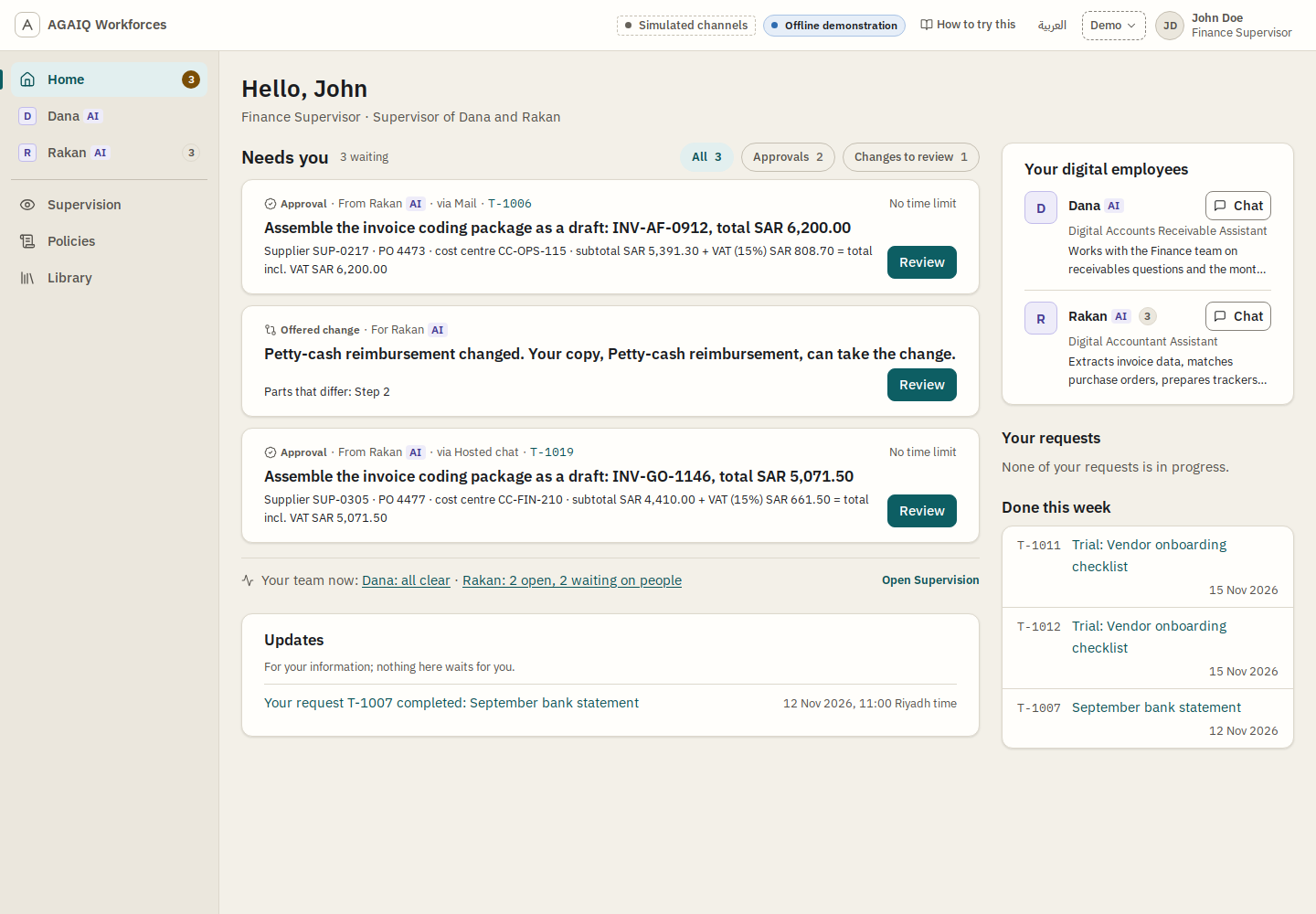
- Open“Home”. It opens after the sign-in.
- TryOn the first invoice, press “Review”. Read the facts. Press “Approve”.
- NoticeEach card names the digital employee, marked AI, and the channel. “Updates” holds what needs nothing. Each approval says “No time limit”: section 6.3 discusses this.
3.2A digital employee’s office
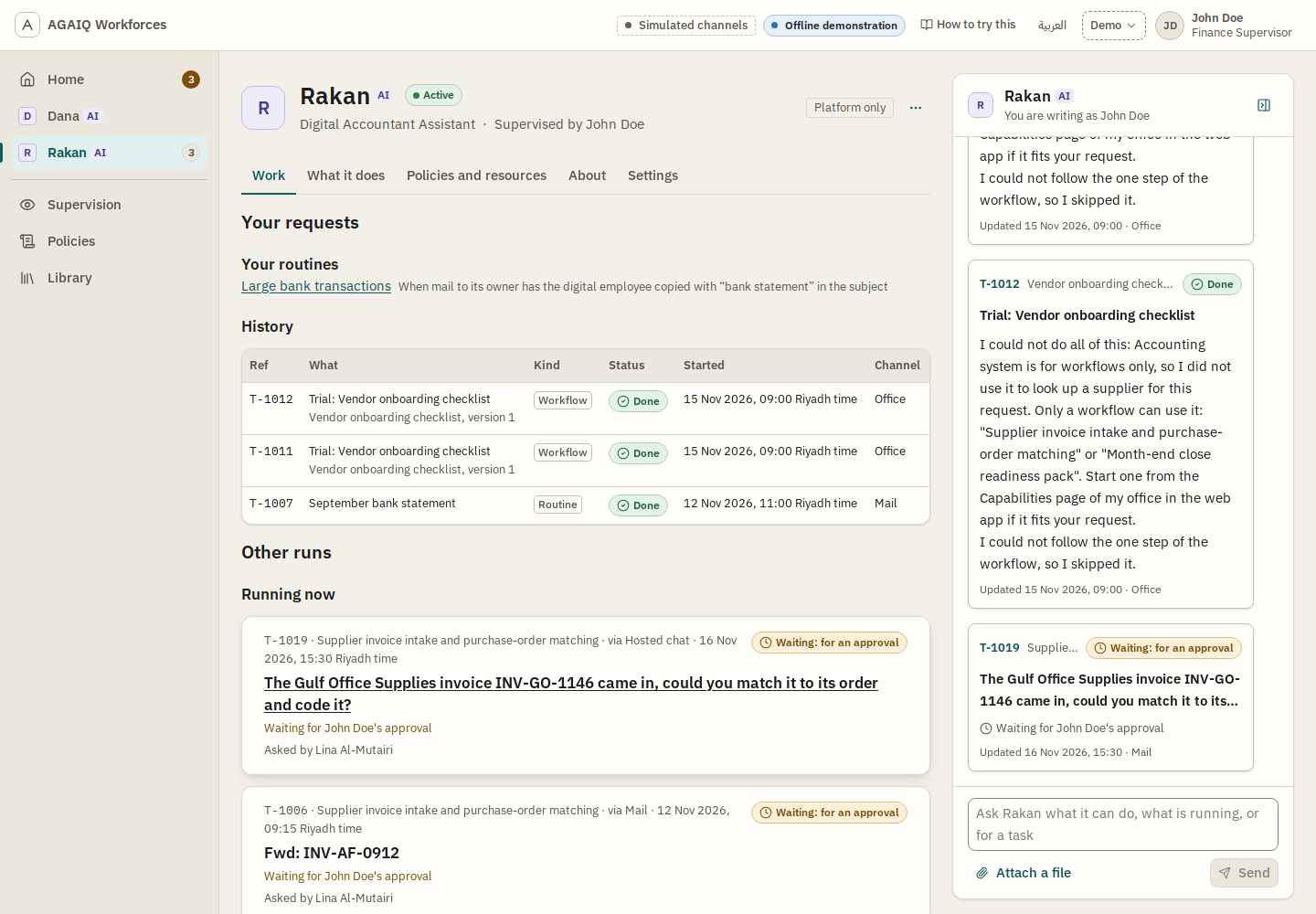
- Open“Rakan” in the left menu, then “Work”.
- TryOpen a request under “Running now”. Read “Why did it do this?”.
- NoticeA waiting request says what it waits for and who has it. The record shows the steps done and the steps left out, with the reason.
3.3A policy in plain words
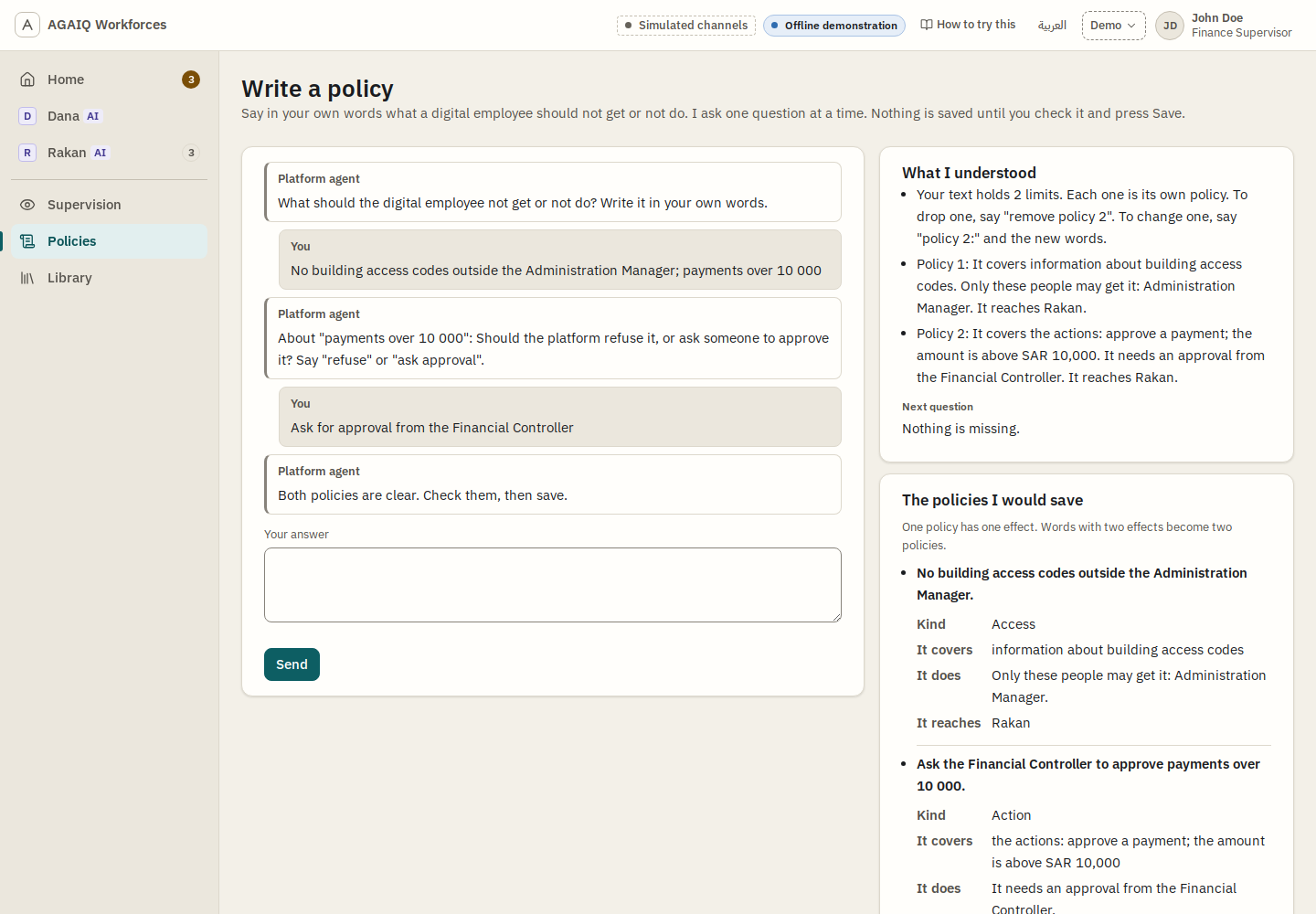
- Open“Policies”, then “Write a policy”.
- TryType No building access codes outside the Administration Manager; payments over 10 000 and press “Send”. Then type Ask for approval from the Financial Controller. If it asks which digital employee, type Rakan.
- NoticeIt asks one question at a time, only for what is missing. “What I understood” comes before the save. Nothing is saved until “Save”.
3.4A workflow in plain words
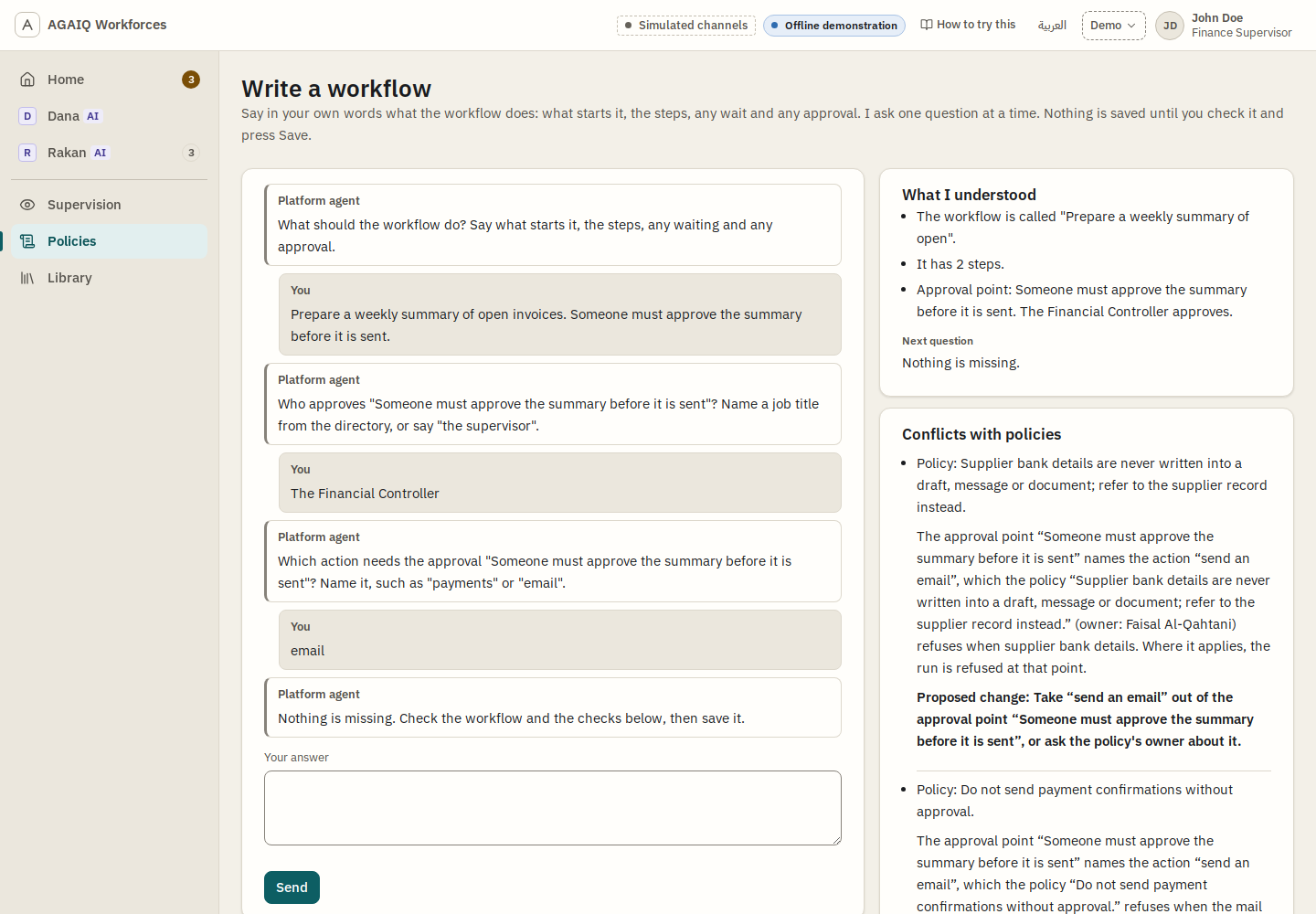
- OpenRakan’s office, “What it does”. Under “Workflows”, press “New workflow”.
- TryType Prepare a weekly summary of open invoices. Someone must approve the summary before it is sent. Then answer The Financial Controller, then email.
- Notice“Conflicts with policies” names each policy the workflow would break, its owner, and a proposed change. A saved workflow is a draft until its supervisor approves it.
3.5Supervision
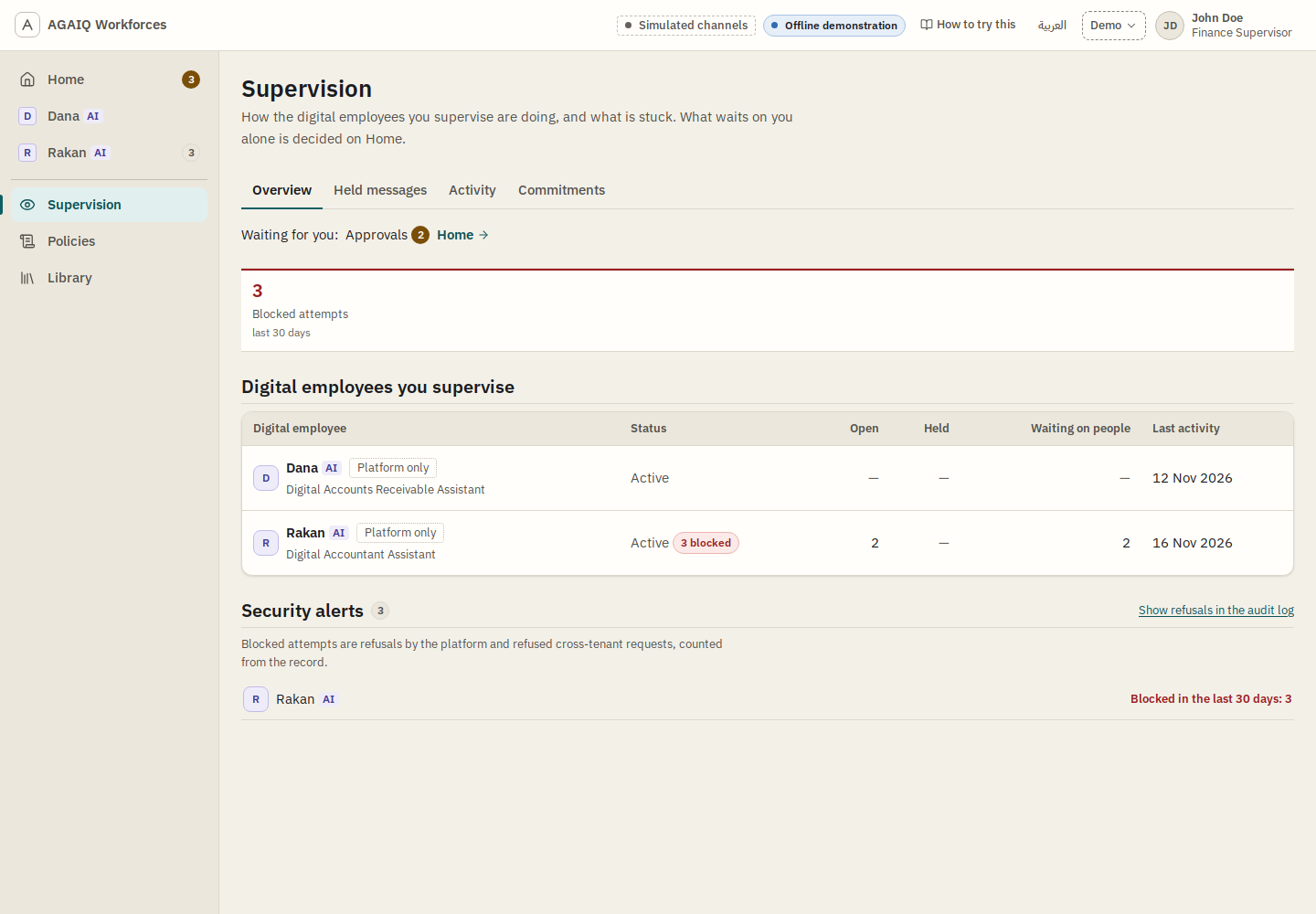
- Open“Supervision” in the left menu.
- TryOpen the tabs “Held messages”, “Activity” and “Commitments”.
- NoticeBlocked attempts are counted per digital employee. “Activity” says what each one did, and why.
For more, open “How to try this” at the top of any screen. It has eight short walks, with the exact words to type.
4What is new since the October version
- Policies in plain words. The platform agent turns a sentence into policies, asks one question at a time, and shows what it understood before the save.
- Workflows in plain words. It asks for approvers, wait limits and the next step. It lists each conflict with a policy, with a proposed change.
- One effect per policy. A policy refuses, asks for approval, limits recipients, or prepares the work for a person. A save that would loosen another owner’s policy is refused, and the owner is named.
- Tasks a person can steer. Five statuses and a short summary. A follow-up reaches a running task. A person can pause, resume, correct, split, cancel, move or merge a task. A wait can have a time limit and a next step.
- “Needs you” on Home. Approvals and offered changes in one list. “Updates” holds what needs nothing.
- “Post it here”. PROPOSED The requester can confirm that a reply goes to a shared place. The platform first checks the exact text for each person in that place.
- Supervision. Blocked attempts, held messages, activity and commitments. A new place waits for the supervisor’s approval.
- Explanations. “Why did it do this?” on each record, and “How to try this” with eight walks.
5Why this is not yet the version for daily use
The demonstrations so far confirmed the shape of the product. We now share one picture of it with AGAIQ. The next step is to make that shape work as a product that people use every day.
That needs four mechanisms under the screens. We build them now. They are the natural next step at this point. Nothing was missed.
- Work that is never lost. Every message and every piece of work is stored first. It is then processed once, even if a server restarts.
- One time service. Schedules, deadlines and reminders all run on one service. Each digital employee’s timers will be visible in one list.
- No task waits without a time limit. The platform checks every open task. When a task waits with no limit, a person is asked. Nothing is decided for them.
- A production-grade database. Each customer’s data is kept apart.
Until these are in place, the demonstration is right for trying the product. It is not right for real company data or daily work. So we do not give full access yet.
6For discussion TO DISCUSS
In these places the demonstration differs from what AGAIQ asked, or does not do it yet. Each one is for a conversation, not a decision on this page.
6.1Who receives sensitive information
- AGAIQ askedThe platform enforces permission before retrieval and before release, not the modelBandar Alghanem, AGAIQReview comment on Conversations with digital employees, section 7.1, 3 November 2026Effective permission must always be the most restrictive intersection of these controls and must be enforced by the platform before retrieval and again before release, rather than determined by the model.Pavel Shpin, DiffcoReply on the same comment, 5 November 2026ok. We answered “ok”.
- TodayCode decides every recipient. A model judges the exact content for each recipient before it leaves. The digital employee reads with its own access.
- To discussWhether the content check meets this condition, or which kinds of data need a fixed rule in code.
6.2Restricted actions
- AGAIQ askedNo final sensitive or official action without human approval, protected by fixed gatesAGAIQInitial Digital Employees Role Cards, final version 1.5, sent by email on 22 July 2026The digital employee must not take final sensitive or official actions without human approval.Bandar Alghanem, AGAIQLinear AIQEXT-18, 19 October 2026High-risk actions are protected by deterministic policy gates..
- TodayA model recognises a restricted action, such as a payment, an HR decision or a change to an official record. The platform then always prepares it for a named person. It never does it itself.
- To discussWhether named kinds of action also need a fixed check in code, and the tests against attempts to get round them.
6.3Time limits on waits
- AGAIQ askedA waiting task pauses with a timer and an escalation deadlineAGAIQReview of the Discovery Plan, Discovery Guide, Product Definition and all related files, v3.1, sent by email on 20 August 2026, section 6Pauses the task with an appropriate timer and escalation deadline..
- TodayA wait has a time limit only when a workflow or a person names one. Other waits show “No time limit”. There is no hidden default.
- To discussPROPOSED The check in section 5, item 3: no task waits without a limit, a person is asked, and each customer sets how long that question waits.
6.4What a task remembers
- AGAIQ askedTask context does not automatically become persistent memoryAGAIQReview of the Discovery Plan, Discovery Guide, Product Definition and all related files, v3.1, sent by email on 20 August 2026, section 2Temporary task and session context must also be treated separately and must not automatically become persistent knowledge or memory..
- TodayNotes from finished tasks are kept and later tasks read them. A person can correct or delete a note.
- To discussHow notes from finished tasks fit this rule.
6.5One request, one record
- AGAIQ askedFixed duplicate prevention across Teams, email and the platformBandar Alghanem, AGAIQReview comment on Conversations with digital employees, section 5.1, 2 November 2026AGAIQ supports the proposed filing order, subject to deterministic duplicate prevention. One request must remain one Work Record across Teams, email and the AGAIQ Platform.Pavel Shpin, DiffcoReply on the same comment, 5 November 2026ok. We answered “ok”.
- TodayA model relates a new message to an open request. A fixed check applies only where a workflow names a key.
- To discussWhich keys make a fixed check, beyond the workflows that name one.
6.6Links and attachments NOT BUILT
- AGAIQ askedControls for phishing, malware and malicious linksAGAIQReview of the Discovery Plan, Discovery Guide, Product Definition and all related files, v3.1, sent by email on 20 August 2026, section 9The platform must provide security controls for spoofing, phishing, malware, malicious links, prompt injection, suspicious instructions and sensitive content..
- TodayScanning of links and attachments is not built. Anything the demonstration shows about it is simulated.
- To discussWhere it comes in the plan.
6.7Scanned PDFs NOT BUILT
- AGAIQ askedReading scanned or image-only PDFs in the first releaseAli Alwayel, AGAIQEmail, 9 September 2026Reading scanned or image-only PDFs (which contain no retrievable text) should not be deferred. … we need it included in the first release..
- TodayNot built. The demonstration reads its one sample scan with a stand-in, not a real reader.
- To discussWhere it comes in the plan.
6.8Which models run in production
- AGAIQ askedNo production use without an approved data-flow assessmentBandar Alghanem, AGAIQLinear AIQEXT-19, 19 October 2026Production use is blocked for any service without an approved data-flow assessment..
- TodayThe demonstration uses no language model. Our own tests run on hosted models.
- To discussPROPOSED No model goes into production use until AGAIQ approves its data-flow assessment.
7How to send feedback
- Reactions, requirements and bugs: as issues in Linear, the tracker AGAIQ asked forAli Alwayel, AGAIQEmail, 5 October 2026We thought it would be easier for us to also create or link the comments to the product backlog.Pavel Shpin, DiffcoEmail, 8 October 2026You can start using it submit issues: requirements, feature requests, bugs.. For a problem on the demonstration, give the request number (such as T-1019), the person acted as, and a screenshot.
- Approvals and confirmations: by email. Only AGAIQ’s written approval settles a pointAGAIQReview of the Discovery Plan, Discovery Guide, Product Definition and all related files, v3.1, sent by email on 20 August 2026, section 4final acceptance of a document, assumption or status should be based on AGAIQ’s express written approval rather than an absence of comment during a meeting or an earlier review cycle..
- Questions: to Pavel Shpin.
What we ask of AGAIQ
- Take the tour in section 3.
- Send reactions in Linear.
- Choose a time to talk through section 6.